
A newly published proof-of-concept tool can prevent Microsoft Defender from installing platform and security intelligence updates by deliberately consuming all available disk space.
The tool, named BigDiskBuster, was published on GitHub on September 19. It currently has no CVE, security advisory, or patch from Microsoft.
The proof of concept was developed by Abdelhamid Naceri, a former Microsoft security researcher whose previous Defender-related exploits have been observed in real-world attacks.
If successful, BigDiskBuster does not disable Microsoft Defender itself. Instead, it prevents the security product from updating its detection content, potentially leaving systems with outdated protection.
However, the proof of concept has not been independently confirmed, and it remains unclear whether a failed Defender update caused by the technique would automatically generate a security alert.
How BigDiskBuster Blocks Defender Updates
BigDiskBuster takes advantage of the way Microsoft Defender handles platform and definition updates.
The tool monitors the C:\ drive for newly created directories associated with Defender’s update process.
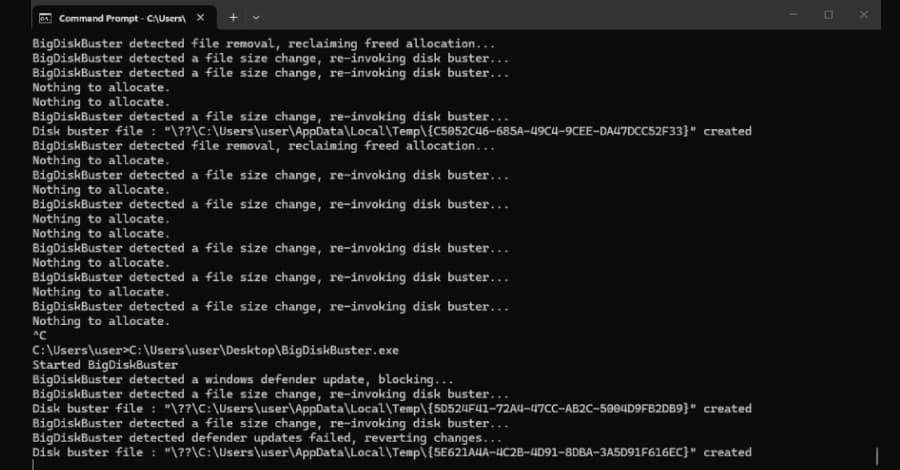
When Defender starts downloading a platform or security intelligence update, BigDiskBuster creates a hidden temporary file and expands it until it consumes the remaining free disk space.
With no usable disk space left, the Defender update cannot complete.
After the update fails, Defender removes its temporary staging directory. BigDiskBuster then deletes its own file, restores the available disk space and waits for Defender to attempt another update.
This allows the process to repeat whenever Defender attempts to update.
The tool also opens a handle to MRT.exe, the Windows Malicious Software Removal Tool, in a way that is intended to prevent Windows Update from replacing the file.
Former Microsoft Researcher Behind the Tool
Naceri is a former Microsoft security researcher who previously worked at the company’s Security Response Center.
He has said that Microsoft dismissed him in 2024 and that he has released exploits publicly without coordinating them with Microsoft since April.
His previous Defender-related tools include:
- BlueHammer
- RedSun
- UnDefend
All three were reportedly exploited in live attacks before Microsoft released fixes. CISA subsequently added the vulnerabilities associated with the tools to its Known Exploited Vulnerabilities (KEV) catalog.
Naceri has continued publishing additional Windows and Defender vulnerabilities at roughly monthly intervals.
BigDiskBuster Is Different From UnDefend
Naceri describes BigDiskBuster as similar to UnDefend, another Defender denial-of-service technique he disclosed in April.
Microsoft addressed the UnDefend vulnerability in May as CVE-2026-45498, with the fix included in Antimalware Platform version 4.18.26040.7.
The two techniques, however, work differently.
UnDefend relied on uncontrolled resource consumption to prevent Defender from updating.
BigDiskBuster, by contrast, deliberately consumes the system’s remaining disk space when Defender begins creating update directories.
It is not currently established whether Microsoft’s May update also protects against the new technique. The different mechanism suggests that the two vulnerabilities may require separate mitigations.
Proof of Concept Still Has Limitations
Naceri himself has described BigDiskBuster as somewhat buggy and in need of rewriting.
He claims that it works across supported Windows versions, but independent researchers have not confirmed those claims.
That distinction is important because the public release is a proof of concept rather than evidence of a fully developed malware campaign.
There is also currently no indication that Microsoft has assigned a CVE or issued an official security advisory for BigDiskBuster.
What Happens When Defender Cannot Update?
Microsoft Defender can continue running even when an update fails.
The problem is that its security intelligence and platform components can become outdated.
Security products depend on regular updates to recognize newly discovered malware and other threats. Repeatedly preventing those updates could therefore reduce the effectiveness of endpoint protection over time.
A screenshot shared by Naceri shows Defender returning a generic Windows error when attempting to update.
It remains unclear from the proof of concept alone whether this particular failure would automatically trigger an alert in Microsoft Defender or Microsoft security monitoring products.
How Administrators Can Check Defender Updates
Because there is currently no official patch or Microsoft-provided workaround specifically for BigDiskBuster, administrators should verify that Defender remains up to date.
In Windows Security, administrators can check:
Virus & threat protection → Protection updates → Check for updates
PowerShell can also be used to inspect Defender’s current component versions:
Get-MpComputerStatus
The output includes fields such as:
AMEngineVersionAMProductVersion
These values can help administrators determine whether Defender’s engine and platform components are current.
What Security Teams Should Monitor
Organizations can look for behavioral indicators associated with the technique.
Potential warning signs include:
- Repeated Microsoft Defender update failures.
- Unusually low free disk space on the system volume.
- Large hidden files appearing in temporary directories.
- Unexpected processes monitoring or interacting with Defender update directories.
- Suspicious access to
MRT.exe. - Unknown binaries running on endpoints.
Security teams can also consider restricting execution of unauthorized or unknown programs through application-control technologies such as Windows Defender Application Control (WDAC) or AppLocker.
These controls could make it more difficult for an attacker to execute a tool such as BigDiskBuster in the first place.
No Official Fix Yet
BigDiskBuster currently sits in an unusual position: it demonstrates a potential way to interfere with Microsoft Defender updates, but there is no publicly documented Microsoft patch or official workaround specifically addressing the technique.
The proof of concept also has not been independently validated.
For defenders, the practical priority is therefore to monitor the health of Microsoft Defender updates, watch for abnormal disk-space consumption and investigate unexpected binaries capable of interfering with security software.
If Microsoft confirms the vulnerability or releases a security update, organizations should review the vendor guidance and apply the relevant fixes as soon as practical.
