
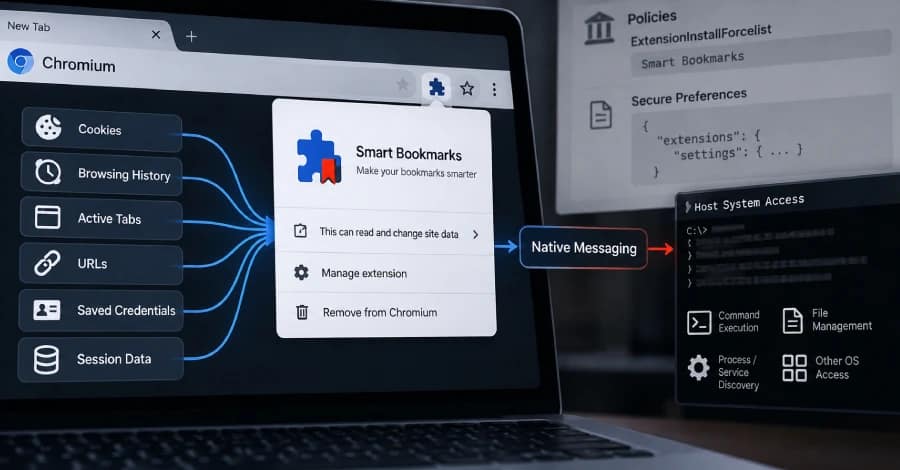
Cybersecurity researchers have uncovered a sophisticated post-exploitation toolkit dubbed PEEP that disguises itself as a legitimate browser bookmarks extension while giving attackers extensive access to Chromium-based browsers and the underlying operating system.
The toolkit targets browsers such as Google Chrome and Microsoft Edge and can steal browsing data, session cookies and credentials while also allowing attackers to execute commands and manage files on compromised systems.
Security researchers at SOCRadar said PEEP is designed to operate after an attacker has already gained administrative privileges or code execution on a target machine.
“Requiring prior administrative or code execution access, its installer injects the extension directly into Chrome/Edge profiles, bypassing Web Store checks and user prompts by forging Chromium’s own Secure Preferences integrity values,” SOCRadar said.
The researchers added that a native-messaging component extends the malware beyond browser surveillance, giving it capabilities for operating-system-level command execution and file management.
PEEP Turns a Browser Extension Into a Backdoor
PEEP masquerades as an extension called “Smart Bookmarks” with the extension ID ejkndncpkdcjcikfhiamcdehdoegilbj.
Once installed, the malicious extension communicates with its command-and-control (C2) infrastructure approximately every 30 seconds over unencrypted HTTP.
Researchers identified C2 infrastructure including:
206.237.30[.]232xfjcc[.]fun
The extension periodically checks the server for new instructions and can send collected information back to the attackers.
The stolen information may include:
- Browsing history
- Active browser tabs
- Current URLs
- Session cookies
- Browser metadata
- Public IP address
- Operating system information
- Locale and time zone data
The malware can also take screenshots, access the clipboard, inject JavaScript into webpages and execute additional browser-based commands.
Native Messaging Gives PEEP OS-Level Capabilities
One of the most significant features of PEEP is its use of a Native Messaging Host.
When a task requires access beyond the browser, the extension launches an executable named nm_host.exe.
This bridge allows the malware to move from browser-level surveillance into the operating system, enabling capabilities such as:
- Executing shell commands
- Managing files
- Discovering processes
- Discovering system services
- Collecting additional credentials
- Supporting session hijacking
SOCRadar described this functionality as transforming PEEP from a conventional browser data stealer into a broader remote-access toolkit.
“Operating in the user context, the extension extracts browser artifacts and uses com.peep.lab/nm_host.exe to run shell commands, manage files, and discover processes and services,” the researchers said.
PEEP Is Based on RedExt
Researchers said PEEP appears to be derived from RedExt, an open-source browser data analysis and red-team framework.
RedExt has previously been associated with GlassWorm activity.
PEEP expands upon the RedExt codebase with additional capabilities designed for persistent malicious operations, including:
- Custom installation routines
- Native host integration
- Periodic heartbeat telemetry
- An extension update mechanism
- Expanded command functionality
- Automated data collection
- Persistence mechanisms
These additions turn what was originally a browser analysis and red-team framework into a more capable post-compromise toolkit.
No Initial Attack Vector Identified
PEEP is considered a post-exploitation framework, meaning it does not appear to provide attackers with an initial method of compromising a computer.
Instead, the attacker must first obtain administrative privileges or execute code on the target system through another attack method.
Once access has been established, PEEP can then be deployed to maintain access and collect information.
The campaign has not been publicly attributed to a specific threat actor.
However, SOCRadar identified several Chinese-language artifacts in the source code, suggesting that the developers may be Chinese-speaking.
There is currently no clear information about the specific organizations or industries being targeted.
Multiple C2 Endpoints Support Remote Operations
PEEP communicates with its C2 infrastructure through several API endpoints.
Researchers identified endpoints responsible for registration, system monitoring, updates, data collection and command execution.
Among them are:
/api/register— Registers a newly compromised agent./api/agents/<id>/heartbeat— Sends browser, operating system and time-zone information./api/extension_update/and/api/extension_crx/— Support extension updates./api/agents/<id>/task_result— Sends command results back to the C2 server./api/exfil— Uploads automatically collected browser and system information./health— Provides system status information without requiring authentication./login— Provides access to the C2 panel.
The /api/exfil endpoint can receive information such as cookies, recent browsing history, open tabs, active URLs, public IP addresses, locale and time-zone information.
Malware Uses Several Persistence Techniques
PEEP uses multiple techniques to keep the malicious extension active even after the browser is restarted.
A key method involves modifying Chromium’s Secure Preferences file.
This file contains integrity information designed to prevent unauthorized changes to browser extensions. PEEP manipulates those values so that the malicious extension can remain enabled.
Because the extension is not distributed through the official Chrome Web Store or other legitimate extension marketplaces, the malware also relies on techniques such as:
- Extension sideloading
- Enterprise force-install policies
- ExtensionInstallForcelist
- ExtensionSettings policies
- Secure Preferences manipulation
- ScriptCache-based fallback mechanisms
These techniques allow attackers to bypass normal browser prompts and extension-installation protections.
PowerShell Scripts Help Install the Extension
Researchers identified several PowerShell scripts associated with the PEEP installation process.
The scripts include:
install_silent.ps1
This script enables Developer Mode and facilitates the installation of an extension outside the official browser marketplace.
patch_secure_prefs.ps1
This script modifies the browser’s Secure Preferences file to help force the malicious extension to remain enabled.
force_enable.ps1
This script performs several persistence-related operations, including removing the extension from external uninstall settings, placing the CRX file in a local directory, registering the extension through Windows registry mechanisms and an external extension manifest, and restarting the browser.
Researchers also found a Python script named patch_secure_prefs_linux.py that performs a similar function on Linux.
The Linux component suggests that the operators may be adapting PEEP to target multiple operating systems rather than limiting the campaign to Windows environments.
PEEP Automatically Harvests Browser Data
After installation, the extension reads its configuration to determine the C2 infrastructure and activate its data-collection functions.
A companion content script called content.js is injected into active webpages.
This gives the malware visibility into browser activity and allows it to perform actions directly within webpages.
Combined with access to cookies, browsing history and active sessions, the capability could enable attackers to steal authentication material and potentially abuse already authenticated online accounts without needing the victim’s password.
Possible Abuse of AI Development Tools
SOCRadar also found references to “Authorized CTF” in the malware’s code.
Researchers suggested that this wording may have been used to frame malicious development activities as authorized cybersecurity research, potentially in an attempt to bypass safety restrictions imposed by AI development tools.
There is currently no definitive evidence showing how these references were used or whether AI systems were directly involved in creating PEEP.
C2 Infrastructure Suggests Existing Activity
The researchers observed information on the /health endpoint indicating 34 agent entries, 10 active sessions and 507 data records.
However, SOCRadar cautioned that these figures cannot be treated as confirmed infections.
The records could include testing activity, simulated agents or other non-production entries. As a result, the actual number of compromised systems remains unknown.
PEEP Turns Chrome and Edge Into Attack Platforms
PEEP demonstrates how a compromised browser can become a powerful platform for maintaining access and stealing sensitive information.
Rather than deploying a conventional standalone backdoor, the toolkit hides much of its functionality inside a browser extension and uses Chromium’s own processes to perform malicious activities.
SOCRadar warned that the approach can make detection more difficult because the malicious logic operates within a legitimate, digitally signed browser environment.
“PEEP builds on existing host compromises, using a native-messaging bridge to convert Chrome/Edge into a persistent backdoor that crosses the browser sandbox to reach the OS,” the researchers said.
The toolkit highlights an increasingly important security concern: browser extensions can become a powerful endpoint attack vector when attackers already have access to a system.
Organizations should therefore monitor for unexpected browser extensions, unauthorized changes to enterprise browser policies, suspicious Native Messaging hosts and unexplained modifications to Chromium preference files.
Administrators should also regularly audit installed extensions and restrict extension installation to approved sources wherever possible.
