
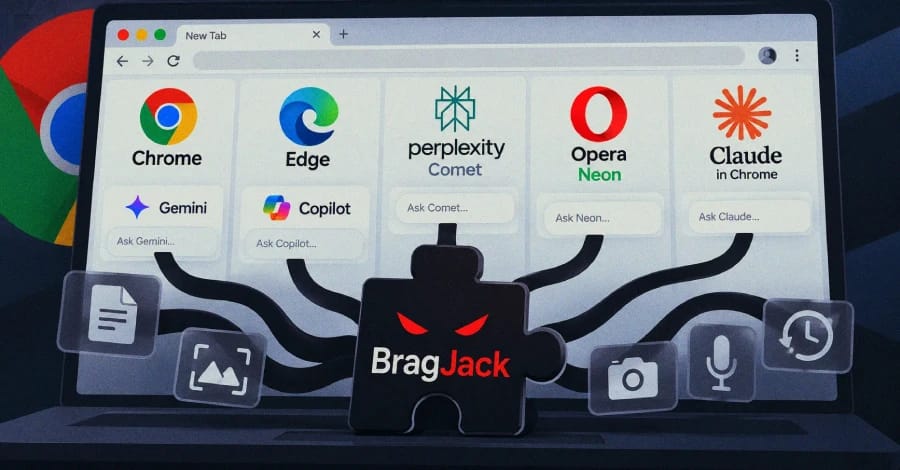
Security researchers at Forever Security have demonstrated how a single malicious browser extension could gain access to the AI assistants integrated into five Chromium-based products: Gemini Live in Chrome, Perplexity Comet, Microsoft Edge, Opera Neon, and Anthropic’s Claude in Chrome extension.
The demonstrations show that an extension with relatively common browser permissions could potentially interact with AI assistants in ways that go far beyond what a normal extension should be able to do.
According to the researchers, the attacks were able to control AI agents in Comet, Edge, Opera Neon, and Claude in Chrome. In Chrome and Comet, the demonstrated techniques could also access files stored on the user’s computer. The Chrome scenario additionally showed that the camera and microphone could be activated.
Importantly, these were researcher demonstrations rather than attacks observed in the wild. The techniques also require a malicious extension to have already been installed and running in the victim’s browser.
How the Browser AI Hijacking Works
Modern AI-powered browser assistants generally consist of two interconnected components.
The first is the browser-side component, which acts as the AI’s “body.” It can interact with webpages, access files, view the screen, use certain browser capabilities, and perform actions.
The second is the AI model or “brain,” which typically runs on the provider’s servers and determines what actions should be taken.
The browser-side component is normally designed to accept instructions only from a trusted webpage associated with the AI service. For example, an AI assistant may trust commands originating from the service’s own website.
Browser extensions, however, are generally expected to modify webpages rather than directly control privileged browser functionality.
Forever Security’s research demonstrated a way to abuse this trust relationship. By taking control of the trusted webpage that the browser-side AI component communicates with, a malicious extension could potentially inject its own instructions and make the AI assistant treat them as legitimate commands.
Common Browser Permissions Can Be Enough
The researchers said the attack technique relies on two permissions commonly requested by legitimate browser extensions.
One permission allows an extension to modify webpage content, a capability frequently used by tools such as ad blockers.
The other is declarativeNetRequest, which allows extensions to modify certain aspects of browser network traffic.
When combined, the permissions could allow an extension to inject code into a trusted webpage and manipulate communications between the page and the browser’s AI functionality.
This creates a significant security concern because the extension does not necessarily need direct access to the AI’s underlying privileged functionality. Instead, it abuses the trusted communication path already established between the browser and the AI assistant.
Chrome Vulnerability Was Previously Disclosed
The Chrome-related technique was previously reported by Forever Security researcher Gal Weizman in March and was referred to as GlicJack.
Google subsequently addressed the vulnerability in Chrome version 143.0.7499.192. The issue is tracked as CVE-2026-0628 and has a CVSS score of 8.8.
The newly reported research extends the same general concept to four additional products: Perplexity Comet, Microsoft Edge, Opera Neon, and Claude in Chrome.
Of those findings, the Edge issue received CVE-2026-55945. Microsoft addressed the vulnerability in Edge version 150.0.4078.48, released on July 2, 2026. The vulnerability carries a CVSS score of 4.2.
The researchers said they received approximately $20,000 in bug bounty payments across the five products, although the individual rewards they listed total $20,500.
Capabilities Demonstrated Across the Five Products
The researchers reported different capabilities depending on the product:
| Capability | Chrome | Comet | Edge | Opera Neon | Claude in Chrome |
|---|---|---|---|---|---|
| Read local files | Yes | Yes | No | No | No |
| Access camera and microphone | Yes | No | No | No | No |
| Control AI agent | No | Yes | Yes | Yes | Yes |
| Access browser profile | Yes | Yes | No | No | No |
| Access browsing history | No | Yes | No | No | No |
| Take screenshots | Yes | Yes | No | No | No |
| User clicks required | No | No | No | No | No |
| CVE assigned | CVE-2026-0628 | None | CVE-2026-55945 | None | None |
The impact varied significantly between the products because each AI assistant has different permissions and capabilities.
Perplexity Comet Had the Broadest Demonstrated Impact
The researchers described Perplexity Comet as the most significant case because the product was designed as an AI-focused browser with an agent capable of performing numerous actions on behalf of the user.
Once the AI agent was hijacked, researchers demonstrated capabilities that included reading local files, accessing browsing history, taking screenshots, and performing actions as the user.
The researchers also reported that Perplexity had restricted extensions from running on its primary website. However, they found a testing subdomain that did not have the same restriction and used it as part of their demonstration.
Claude in Chrome Had More Limited Impact
The Claude in Chrome finding was described as the least serious of the five cases.
Unlike the other products, Claude in Chrome is itself a browser extension rather than a standalone browser. As a result, the demonstrated scenario involved one extension abusing another extension’s functionality.
Anthropic reportedly classified the issue as medium severity and paid a bug bounty for the finding.
The researchers also said Anthropic identified them as the first party to report the particular issue. However, other security researchers have previously disclosed related weaknesses involving the extension.
Edge Attack Required Multiple Weaknesses
The Microsoft Edge scenario reportedly required a more complicated attack chain.
According to the researchers, Microsoft had already implemented protections designed to prevent extensions from exploiting the same type of trust relationship. To bypass those protections, the researchers combined two separate weaknesses.
The technique involved taking over a Microsoft webpage that was permitted to communicate with the Edge AI assistant.
The researchers then exploited a timing issue, commonly referred to as a race condition, to manipulate the AI agent’s transition between its reasoning and action stages.
This ultimately caused the AI assistant to execute an attacker-controlled instruction.
Opera Neon Presented a Simpler Attack Path
The researchers said Opera Neon presented a comparatively straightforward scenario.
The AI functionality reportedly trusted pages hosted on Opera’s own domain, while the browser did not prevent extensions from executing code on those pages.
This allowed the researchers to inject code into a trusted page and use it to send instructions to the AI functionality.
Forever Security said Opera independently discovered the same underlying issue at approximately the same time and still awarded a bug bounty for the report.
No Evidence of Exploitation in the Wild
As of September 16, 2026, neither of the two CVEs associated with the research was listed in the U.S. Known Exploited Vulnerabilities catalog.
There was also no public evidence indicating that the demonstrated techniques had been used in real-world attacks against users.
Another important limitation is that all of the scenarios require the malicious extension to already be installed and running in the victim’s browser.
That means the extension installation itself remains a critical part of the attack chain. Attackers would still need to convince a user to install a malicious or compromised extension before attempting to exploit these techniques.
Users Should Keep Browsers and Extensions Updated
For users running affected products, keeping browsers and extensions updated remains an important defensive measure.
Chrome users should update to version 143.0.7499.192 or later, while Edge users should use version 150.0.4078.48 or later to address the vulnerabilities associated with the research.
Users of Comet, Opera Neon, and Claude in Chrome should also ensure that their software is running the latest available versions and remove browser extensions they do not recognize or need.
The research highlights a broader security challenge created by AI-powered browsers and browser assistants.
Traditional browser security models are designed to keep extensions, webpages, and privileged browser functionality separated. AI agents increasingly blur those boundaries by giving browser-based software the ability to see information and perform actions on behalf of users.
When an AI assistant trusts a webpage as an instruction source, a malicious extension that can manipulate that webpage may potentially gain an indirect path to the AI agent.
As AI-powered browsing becomes more capable, securing these communication boundaries will become increasingly important. The findings also demonstrate why organizations and users should treat browser extensions as a significant part of their security posture, particularly when those extensions can modify webpages or network traffic.
