
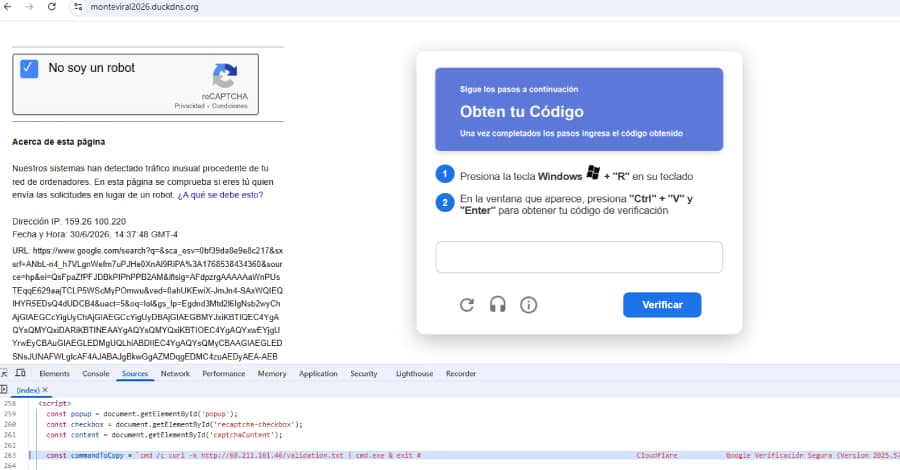
Cybercriminals have launched a sophisticated malware campaign aimed at customers of Mexican banks, fintech companies, payment processors, and cryptocurrency exchanges. The operation relies on deceptive fake CAPTCHA pages to trick users into infecting their own devices with a powerful PowerShell-based malware toolkit known as SCMBANKER.
Security researchers at Elastic Security Labs are tracking the campaign under the name REF6045. According to their investigation, the malware has been active since at least October 2025 and is specifically engineered to compromise users interacting with Mexico’s financial institutions.
Fake CAPTCHA Used as the Initial Attack Vector
The attack begins with a fraudulent CAPTCHA page designed to resemble Google’s image verification system. Visitors are instructed to identify images containing a fire hydrant, making the page appear legitimate.
After completing the challenge, victims are told to copy and paste a command into the Windows Run dialog. Instead of verifying the user, this action executes a malicious PowerShell script that starts the infection process.
Fake Windows Update Hides the Malware Installation
Once the malicious command is executed, a batch script launches Microsoft Edge in kiosk mode and displays a fake Windows Update screen. This visual distraction keeps users occupied while the malware silently installs itself in the background.
The installer then checks whether it has administrator privileges. If elevated permissions are not available, it repeatedly displays Windows User Account Control (UAC) prompts until the victim grants access. After receiving administrator rights, the malware temporarily locks mouse movement, ensuring the installation process continues without interruption.
During this time, additional malware components are downloaded using Windows’ built-in bitsadmin utility.
Persistence Mechanisms Ensure Long-Term Access
To survive system reboots, SCMBANKER establishes persistence by creating entries in both the Windows Startup folder and the Registry Run key.
After completing the installation, the malware attempts to close the fake Windows Update screen and forces the computer to restart. Once Windows boots again, a Visual Basic Script automatically launches the malware’s primary modules.
Powerful Toolkit Designed for Financial Theft
SCMBANKER includes numerous PowerShell modules that allow attackers to monitor and manipulate victims in real time. Key capabilities include:
- Monitoring online banking sessions.
- Capturing screenshots during financial transactions.
- Logging keystrokes.
- Hijacking clipboard contents to replace copied bank account or card numbers.
- Displaying fake banking security alerts that encourage victims to call attacker-controlled phone numbers.
- Redirecting victims to phishing websites.
- Installing the commercial Remote Utilities remote access tool for complete control of infected systems.
- Downloading updates and executing additional PowerShell commands remotely.
The malware actively watches for browser windows associated with Mexican financial institutions. Once a banking session is detected, attackers can selectively activate different modules depending on the target.
Phishing Redirects and Telegram Notifications
One of the malware’s more advanced features redirects victims to counterfeit banking websites that closely resemble legitimate online banking portals.
These phishing pages collect browser information, device details, and IP addresses before automatically sending the data to attackers through Telegram. This real-time notification system alerts operators whenever a potential victim lands on the fake banking page, allowing them to continue the attack immediately.
Researchers Believe AI Helped Develop the Malware
Elastic researchers observed numerous indicators suggesting that large language models (LLMs) assisted in developing significant portions of SCMBANKER.
The code contains unusually detailed comments alongside inconsistent variable names and leftover artifacts commonly associated with AI-generated programming. Researchers believe the developers likely used Spanish-language prompts with coding assistants such as GitHub Copilot or Cursor before manually obfuscating portions of the code.
Poor Coding Quality, But Effective Attacks
Despite its relatively poor coding practices and several operational security mistakes, the malware remains dangerous. An exposed server directory even allowed researchers to recover the attackers’ complete web infrastructure, providing valuable insight into how the campaign operates.
The investigation also revealed evidence that the attackers are actively managing infected systems through a live dashboard. Rather than automating every attack, they monitor victims in real time and decide whether to deploy browser redirects, clipboard hijacking, fake banking alerts, or full remote access based on the perceived value of each target.
Final Thoughts
The SCMBANKER campaign demonstrates how cybercriminals continue to combine social engineering with legitimate Windows tools to bypass user defenses. The addition of AI-assisted development highlights a growing trend where attackers can rapidly build sophisticated malware with less technical effort.
For users, the attack serves as a reminder that legitimate websites will never ask you to paste commands into the Windows Run dialog or PowerShell to complete a CAPTCHA or security verification. Remaining cautious of unexpected prompts and avoiding suspicious verification pages can significantly reduce the risk of infection.
